Aucun témoin publicitaire ni de suivi. / No advertising or tracking cookies. Confidentialité / Privacy
Orch Dispatch

Flight school management for Part 61 and Part 141 schools

Run your flight school from one screen, not a whiteboard.

Orch Dispatch puts scheduling, dispatch, maintenance tracking and student records in one school account. Who flies what, when, in which aircraft, and whether that aircraft is legal to fly, on the iPad at the counter and on every instructor's phone.

No card for the trial. Instructors and students join free.

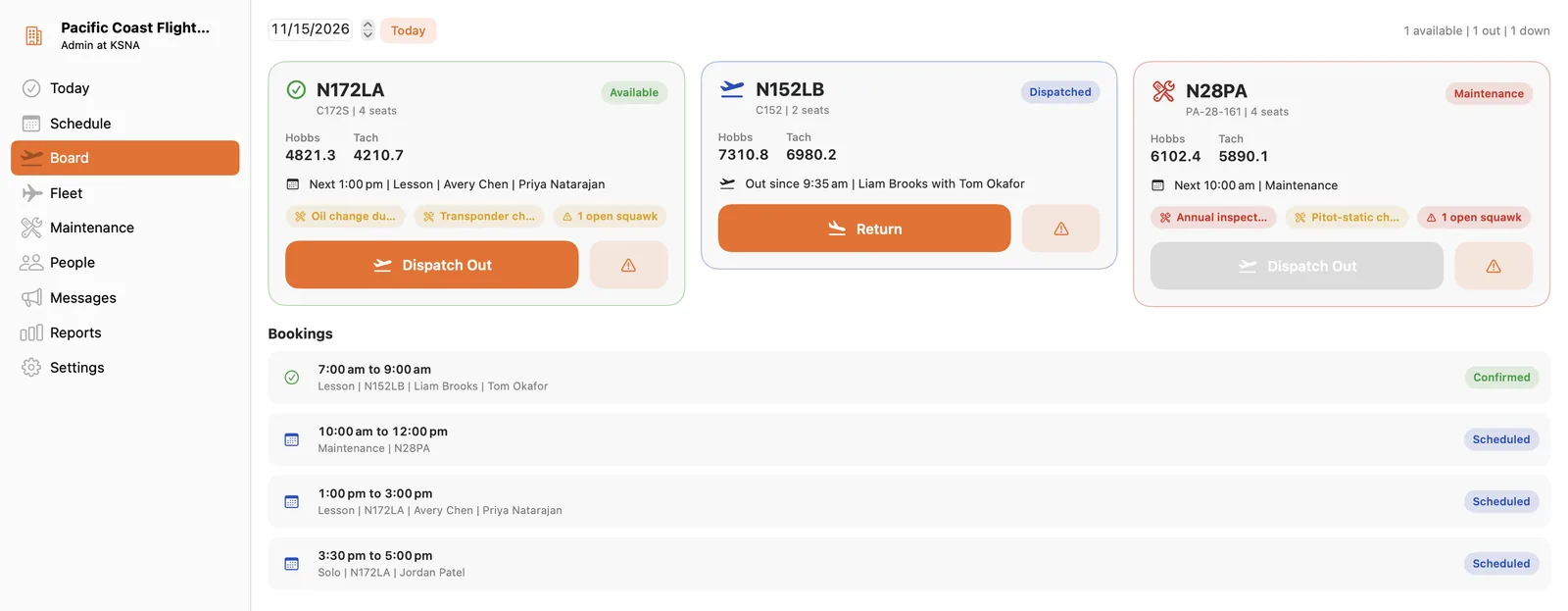
Orch Dispatch board on Mac showing three aircraft: available, dispatched and down for maintenance, with today's bookings

One account for everyone who touches an airplane

Owners

See every aircraft, booking and due item without walking to the whiteboard. Know which airplane earns and which one sits.

Chief instructors

Syllabus progress, lesson notes and signed endorsements for every student, and every instructor's hours, in one place.

Dispatchers

A checklist per aircraft type, Hobbs and tach out and in, and squawks that ground the aircraft on the spot.

Maintenance

Due-in-hours and due-in-days for every inspection on one board, fed by the hours dispatch posts after each flight.

What it does

Everything below ships today in the apps and the browser. Screens are from the demo school.

Scheduling

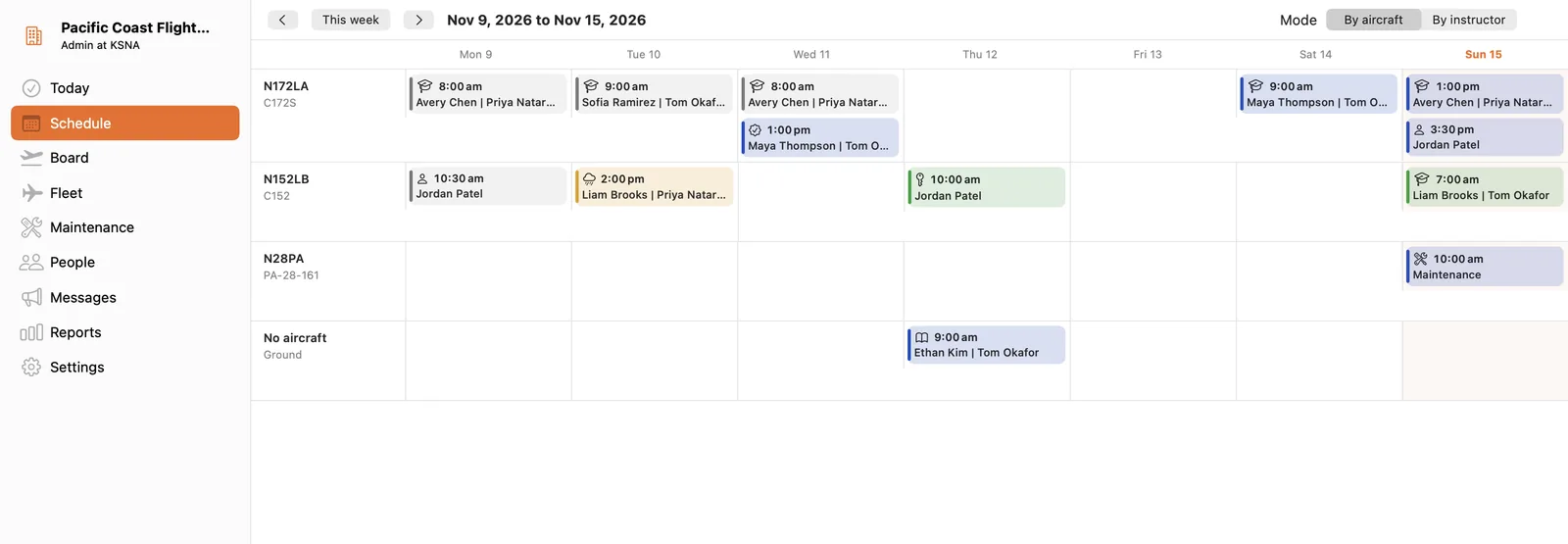
One calendar. No double bookings.

Aircraft, instructor and student bookings live on one week grid you can view by aircraft or by instructor. Two lessons can never claim the same airplane or the same CFI.

  • Conflict detection for aircraft and instructors
  • Recurring weekly lessons
  • Weather holds and cancellations with a reason
  • A waitlist that is promoted when a slot opens
  • Email reminders before each lesson
Orch Dispatch week schedule by aircraft with lessons, solos and maintenance blocks

Dispatch desk

Built for the iPad at the counter.

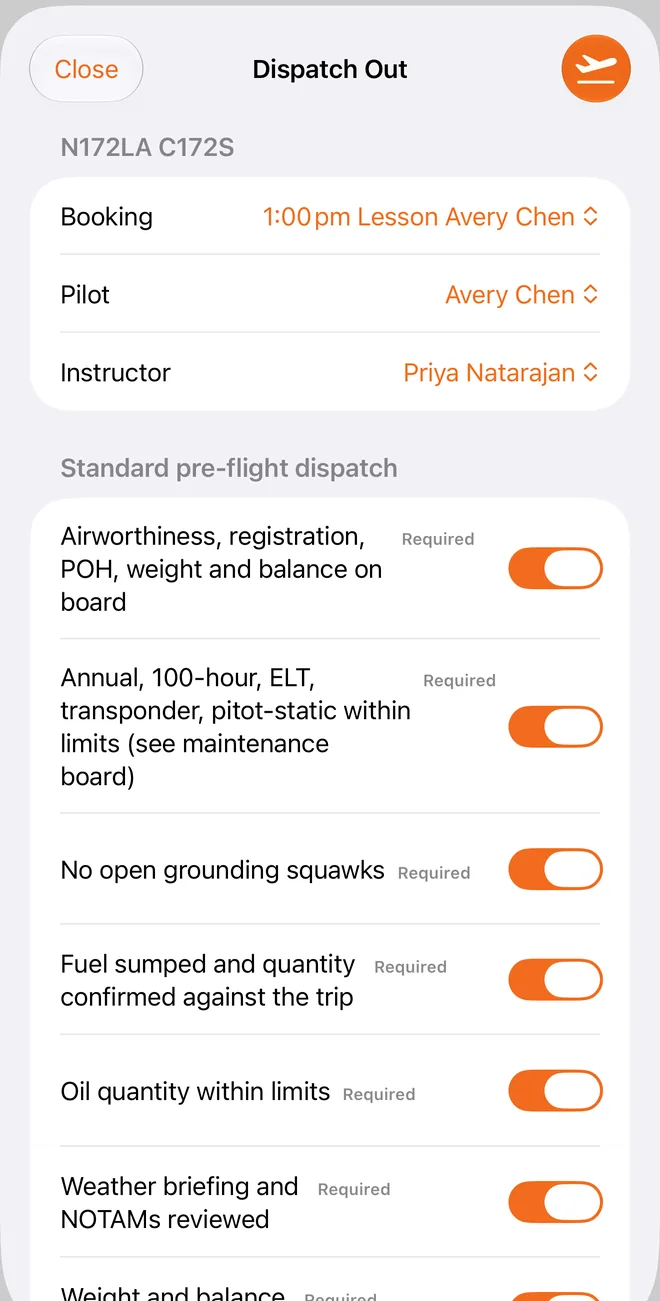
Dispatch out with the checklist you configure for each aircraft type, record fuel and oil, Hobbs and tach. When the flight returns, the hours post to the aircraft by themselves.

  • Configurable pre-flight checklist per aircraft type
  • Hobbs and tach out and in, fuel and oil on departure
  • A squawk entry that grounds the aircraft immediately
  • Aircraft status: Available, Dispatched, Down for maintenance, Reserved
Dispatch Out sheet on iPhone with the pre-flight checklist for N172LA

Fleet and maintenance

Know what is due before it grounds you.

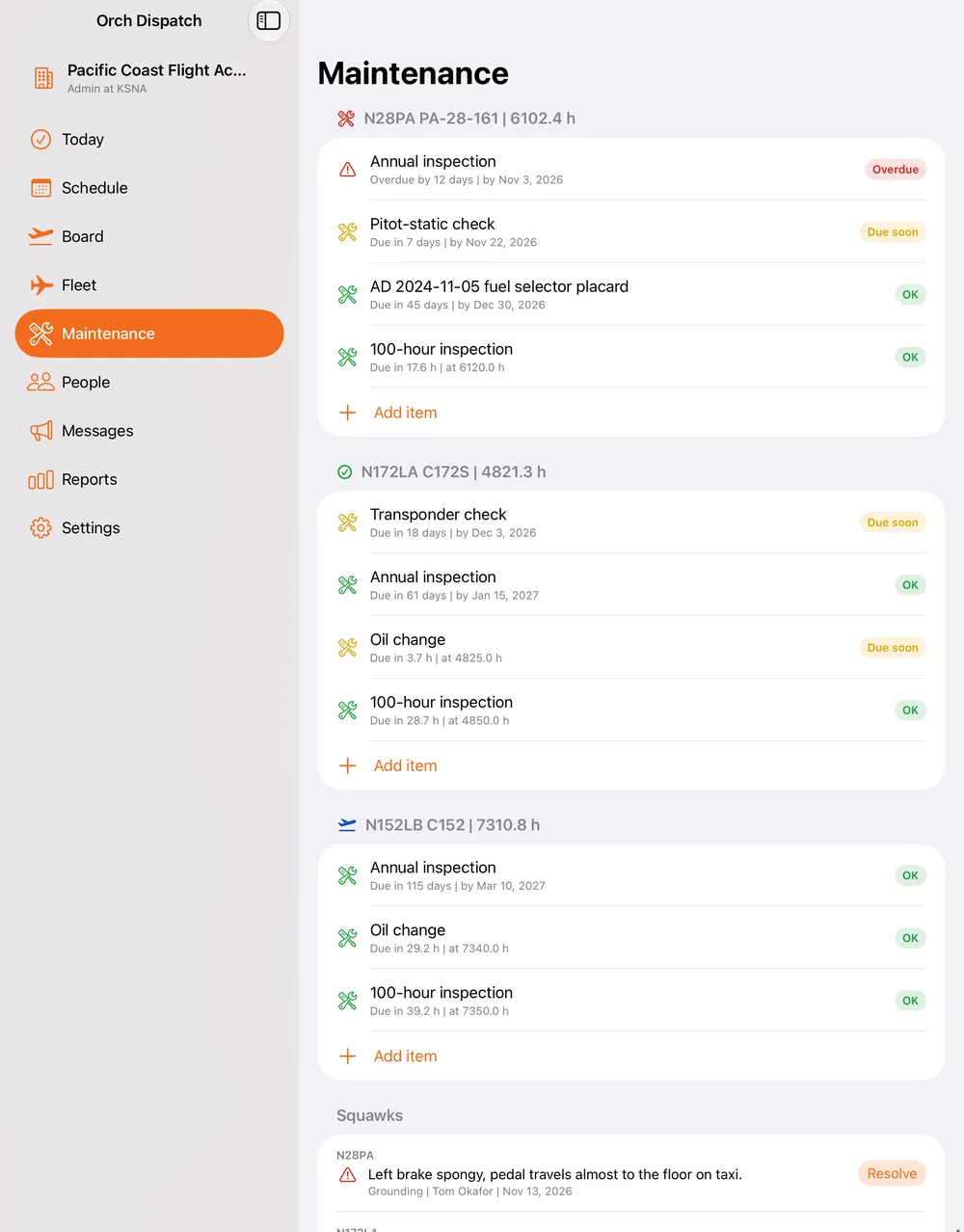
Every aircraft with current Hobbs, tach and airframe hours, and every recurring item with due-in-hours or due-in-days on one maintenance board that turns amber, then red.

  • 100-hour, annual and oil changes
  • ADs, ELT, transponder and pitot-static checks
  • Open squawks shown per aircraft until resolved
  • Hours come from dispatch, not from a second logbook
Maintenance board on iPad with annual, 100-hour, oil and pitot-static items per aircraft

Students and instructors

Training records that follow the student.

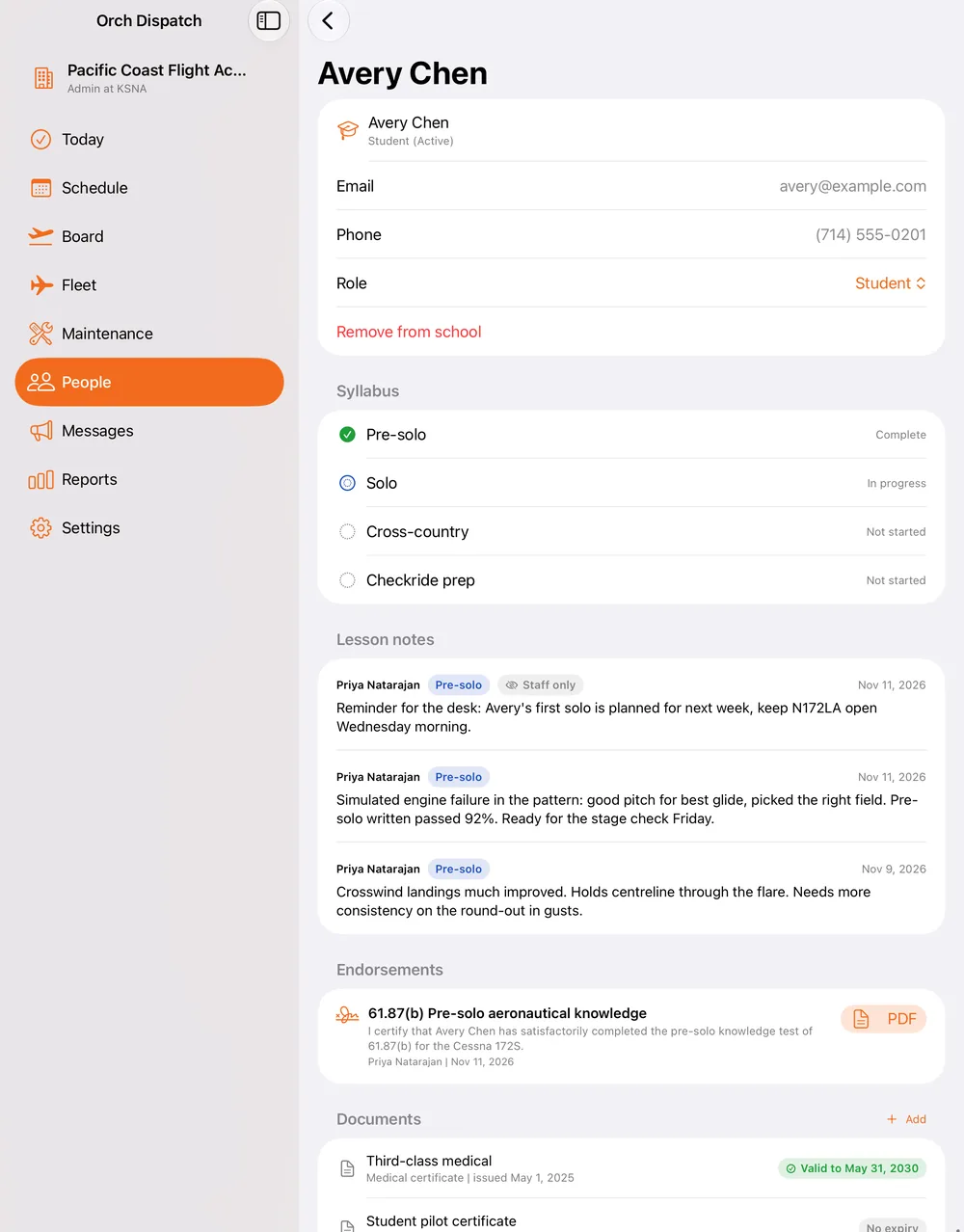
Lesson notes go to the student after every flight. Syllabus stages show where each student stands. Instructors sign endorsements with a drawn signature, stored as a PDF.

  • Configurable syllabus stages: pre-solo, solo, cross-country, checkride prep
  • Endorsement log with drawn signature, saved as PDF
  • Expiry tracking for medicals, student pilot certificates and knowledge tests
  • Announcements to the whole school or only to students
  • Students see only their own data
Student profile on iPad with syllabus progress, lesson notes, endorsements and documents

Today and reports

The day at a glance, the month in a CSV.

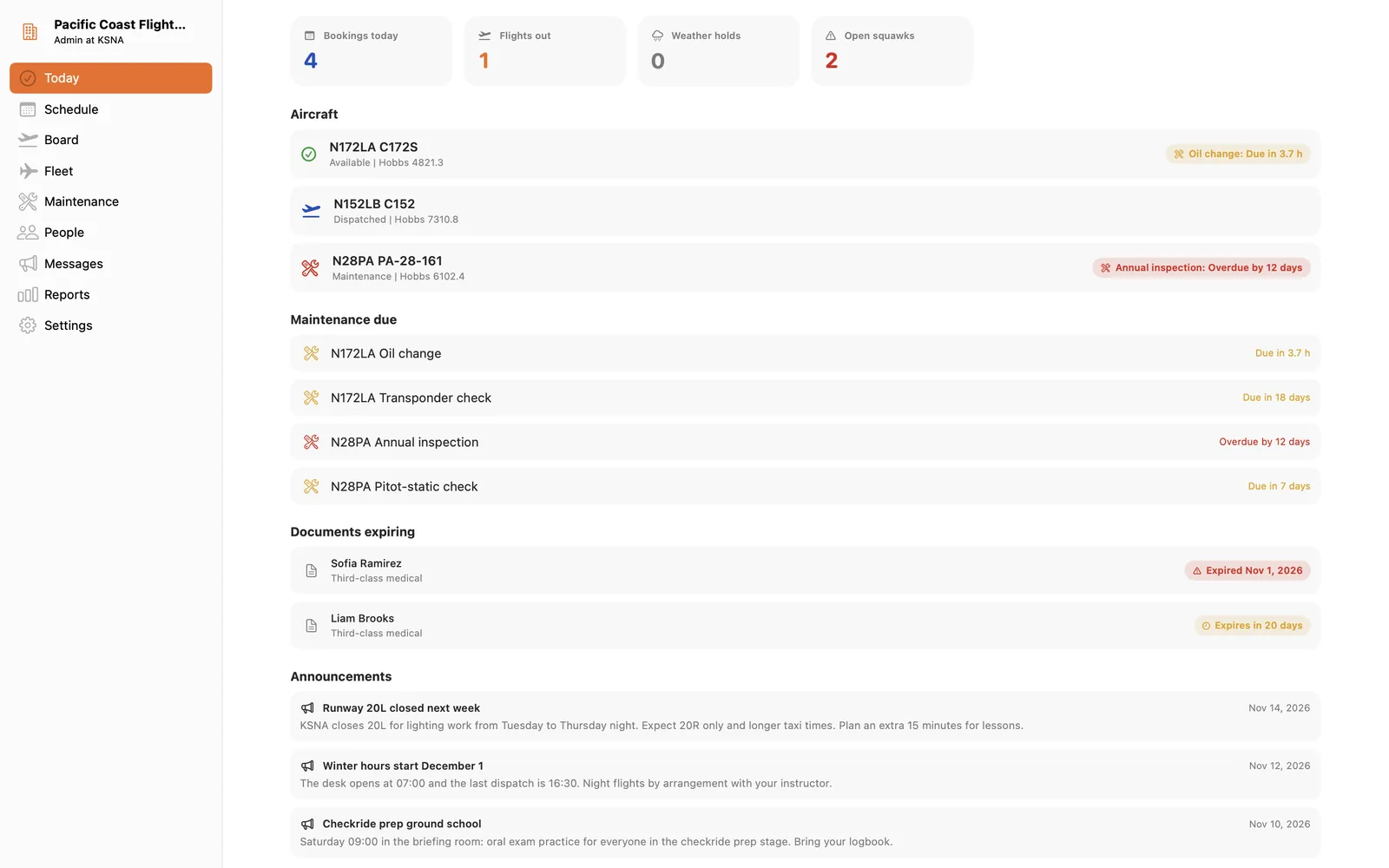
Today shows what is flying, what is down and what needs attention. Reports cover aircraft utilisation and instructor hours, with a CSV of every completed flight for your invoicing.

  • Aircraft utilisation and instructor hours
  • Hours CSV: one row per flight with Hobbs and tach
  • Audit log of changes for admins
Today screen on Mac with aircraft status, due maintenance and expiring documents

Paper and spreadsheets, compared

Most small schools run on a whiteboard, a binder and a spreadsheet. They work, until the day they don't.

TaskPaper and spreadsheetsOrch Dispatch
Double bookings Caught when two people arrive for one airplane Blocked when the booking is made
Aircraft status Whiteboard, phone calls, the key box Available, Dispatched, Down or Reserved on every screen
Hobbs and tach Copied from a paper sheet into a spreadsheet Entered once at return, posted to the aircraft
Maintenance due Someone does the math, hopefully in time Due-in-hours and days, amber then red
Squawks A note in the binder the next renter may not read Grounds the aircraft until it is resolved
Endorsements Paper in a folder, signature on file somewhere Signed in the app, stored as PDF
Medical and certificate expiry Discovered at dispatch Reminders before they lapse
Lesson reminders Texts sent by hand Email reminders sent automatically
Monthly hours for billing An evening with a calculator One CSV export
Access In the office, during office hours iPad, iPhone, Mac, Android and browser

Simple pricing per school

Every feature on every plan. Instructors, staff and students never pay. 14-day free trial.

Starter

For a small Part 61 operation

$149.99 USD per month

  • Up to 3 aircraft
  • Up to 10 active students
  • Unlimited instructors and staff
  • Every feature, every device

Enterprise

Multi-base schools and academies

Let's talk

  • A school account for each base
  • Volume pricing across bases
  • Guided setup of fleet, maintenance items and checklists
  • Annual invoicing on request
Contact us

Prices in US dollars; taxes may apply. On the web, pay by card monthly or yearly for the price of 10 months. In the apps, subscriptions are billed monthly through the App Store or Google Play. Cancel any time.

On every screen in the building

iPad

The dispatch desk at the counter.

iPhone and Android

Schedules, notes and endorsements on the ramp.

Mac

The office view for owners and chief instructors.

Browser

Every role, any computer, nothing to install.

If a store listing is not live in your region yet, the browser version has every feature and the same account.

Questions schools ask

Where is our data stored, and who owns it?

Your school's data (members, aircraft, bookings, flights, squawks, maintenance, notes, endorsements and document expiry dates) is stored on Orchestr Aerospace's servers in a managed Postgres database, encrypted in transit. It belongs to your school. Admins can export every completed flight as CSV at any time from Reports.

What about student privacy?

Access follows roles. Students see only their own bookings, notes, progress and endorsements. Instructors, dispatchers and maintenance see what their job needs. There is no advertising, no tracking and no third-party analytics in the apps. For medicals, only the expiry date is stored, never medical details.

Which devices does it run on?

iPhone, iPad and Mac (one App Store purchase covers all three), Android phones and tablets, and any modern browser at orchaerospace.com/dispatch. Every role gets the full product in the browser, so nothing has to be installed at the front desk. Everything stays in sync.

How long does onboarding take?

Setup is quick. The admin creates the school, adds the aircraft with current Hobbs and tach, and shares invite codes. Instructors, dispatchers, maintenance staff and students join with their code. Book a demo and we will walk through your fleet and checklists with you.

Do instructors and students have to pay?

No. The school pays one plan. Instructors, staff and students join free, on any device.

How does billing work, and can we cancel?

Every plan starts with a 14-day free trial, no card needed on the web. Pay by card on the web (monthly, or yearly for the price of 10 months), or through the App Store or Google Play from the apps. Cancel any time; the plan runs to the end of the period you paid for. After that the school stays readable so you can export your records.

What if we outgrow Starter?

Starter covers up to 3 aircraft and 10 active students. Upgrade to School in Settings at any time for unlimited aircraft and students; nothing is lost or re-entered.

Can we delete everything?

Yes. Any user can delete their account at orchaerospace.com/account/delete, and a school admin can remove members. Write to john@orchestrsim.com to close a school entirely.

See it with your own fleet

Fifteen minutes on a call: your aircraft, your checklists, your questions. Then a 14-day trial with your real schedule.

Book a demo
Five roles: admin, dispatcher, instructor, student, maintenance Email reminders for lessons and expiring documents Signed endorsements stored as PDF

Made by Orchestr Aerospace, the makers of Jeb's Horizon EFB and the ORCH A320 Guide.